Case Study, Dec 2025
Case Study, Dec 2025
Reducing silent marketplace downtime by 40% through better feature discovery
Redesigning Voosh’s Downtime Controller and its activation journey so multi store restaurant brands actually discover, try, and rely on it
Redesigning Voosh’s Downtime Controller and its activation journey so multi store restaurant brands actually discover, try, and rely on it
TL;DR
Redesigned Voosh’s Downtime Controller and how people find and start using it.
Shifted the story from “uptime percent” to “lost orders and money”.
Brought the feature to the main dashboard and added a simple, safe trial flow.
Result in 6 weeks: about 40 percent less non genuine downtime per store, about 140 percent more accounts using the feature, and about 210 percent more accounts turning on auto reopen.
Redesigned Voosh’s Downtime Controller and how people find and start using it.
Shifted the story from “uptime percent” to “lost orders and money”.
Brought the feature to the main dashboard and added a simple, safe trial flow.
Result in 6 weeks: about 40 percent less non genuine downtime per store, about 140 percent more accounts using the feature, and about 210 percent more accounts turning on auto reopen.
Role
Sole Product Designer
Sole Product Designer
Product
Downtime Controller
Downtime Controller
Team
Founder, 3+ engineers, Sales
Founder, 3+ engineers, Sales
00
Key Outcomes
Key Outcomes
40%
40%
reduction in non-genuine downtime minutes per store
80%
80%
increase in accounts that unlock the Downtime Controller module
54%
54%
increase in accounts that set up at least one auto-reopen rule
01
Context
Context
Voosh is a control tower for restaurant brands that run many outlets on apps like UberEats and DoorDash. Teams use it to see performance, money, and daily operations across all their stores.
In this setup, if a store is offline, it does not earn anything. Marketplaces sometimes turn stores off. Sometimes it is valid, like stock out or safety. Many times it is not, like a short system issue or a wrong flag.
For brands with more than 50 stores, this becomes a quiet leak. One or two outlets go offline on a marketplace. No one notices in time. By the time someone checks the dashboard, the peak time is gone.
Voosh already had data about which stores were online or offline. The next step was to turn this into a feature that helps teams see and fix these issues quickly.
Voosh is a control tower for restaurant brands that run many outlets on apps like UberEats and DoorDash. Teams use it to see performance, money, and daily operations across all their stores.
In this setup, if a store is offline, it does not earn anything. Marketplaces sometimes turn stores off. Sometimes it is valid, like stock out or safety. Many times it is not, like a short system issue or a wrong flag.
For brands with more than 50 stores, this becomes a quiet leak. One or two outlets go offline on a marketplace. No one notices in time. By the time someone checks the dashboard, the peak time is gone.
Voosh already had data about which stores were online or offline. The next step was to turn this into a feature that helps teams see and fix these issues quickly.
02
Problem
Problem
For restaurant brands
No single place to see which stores are offline, on which app, and why
No single place to see which stores are offline, on which app, and why
Ops and regional managers usually find issues only after order drops or complaints
Ops and regional managers usually find issues only after order drops or complaints
Manual checks and calls do not work once you have many stores
Manual checks and calls do not work once you have many stores
For Voosh (v1 reality)
In March 2025 we launched the first version of Downtime Controller.
It checked store status every few minutes on UberEats and DoorDash and could:
send alerts
auto reopen stores that should be online
On paper, this could save a lot of money. In reality, very few accounts used it.
But in practice:
But in practice:
The feature was hidden in a deep settings page
The feature was hidden in a deep settings page
The copy spoke about “uptime percent” instead of lost orders or money
The copy spoke about “uptime percent” instead of lost orders or money
Auto reopen felt risky because people did not know where it will act
Auto reopen felt risky because people did not know where it will act
To unlock it, users had to talk to sales first, which added delay and friction
To unlock it, users had to talk to sales first, which added delay and friction
Result
Very few accounts turned on the feature, and even fewer turned on auto reopen.
The problem was not the logic. The problem was that users were not finding it, did not clearly get the value, and did not feel safe to try it.
Very few accounts turned on the feature, and even fewer turned on auto reopen.
The problem was not the logic. The problem was that users were not finding it, did not clearly get the value, and did not feel safe to try it.
Problem Statement:
How can we turn Downtime Controller from a hidden settings page into an easy to find, easy to understand, and safe to try feature that restaurant teams actually use?
How can we turn Downtime Controller from a hidden settings page into an easy to find, easy to understand, and safe to try feature that restaurant teams actually use?
03
Goals & Constraints
Goals & Constraints
User goals – Ops & leaders
01
Ops teams:
See quickly which stores are down, where, and why
Let the system fix simple, non genuine downtime automatically
Stay in full control when the store should be closed for real reasons
See quickly which stores are down, where, and why
Let the system fix simple, non genuine downtime automatically
Stay in full control when the store should be closed for real reasons
02
CXOs / owners:
See downtime in terms of orders and money at risk
See Voosh as a tool that protects revenue, not just a reporting tool
See downtime in terms of orders and money at risk
See Voosh as a tool that protects revenue, not just a reporting tool
Business goals for Voosh
Increase the number of accounts that unlock Downtime Controller
Increase the number of accounts that complete auto reopen setup
Reduce non-genuine downtime minutes per store
Use Downtime Controller as a strong reason for brands to buy and grow with Voosh
Increase the number of accounts that unlock Downtime Controller
Increase the number of accounts that complete auto reopen setup
Reduce non-genuine downtime minutes per store
Use Downtime Controller as a strong reason for brands to buy and grow with Voosh
Constraints
Incremental redesign: v1 was live with real users, so we could not break current setups
Incremental redesign: v1 was live with real users, so we could not break current setups
Sales-led pricing: custom pricing per account; no generic “$X/month per account"
Sales-led pricing: custom pricing per account; no generic “$X/month per account"
04
Approach
Approach
Diagnosing v1
01
Amplitude – visits, funnel drop-offs, setup completion
Amplitude – visits, funnel drop-offs, setup completion
02
Hotjar – navigation patterns, confusion, abandonment
Hotjar – navigation patterns, confusion, abandonment
03
Sales/CS – how they pitched the module, and what confused customers
Sales/CS – how they pitched the module, and what confused customers
Key Findings
01
01
Low discoverability – buried nav, looked like a setting, not a “protect revenue” tool
Low discoverability – buried nav, looked like a setting, not a “protect revenue” tool
02
02
Weak story– we spoke about uptime percent, not about orders and money
Weak story– we spoke about uptime percent, not about orders and money
03
03
Scary automation – people were scared that auto reopen might open stores that should stay closed
Scary automation – people were scared that auto reopen might open stores that should stay closed
04
04
Sales-only unlock – people could not try the feature on their own, they always needed a call
Sales-only unlock – people could not try the feature on their own, they always needed a call
Reframing the problem
The main design problem was not “how do we improve this screen”.
It became:
How can we make Downtime Controller easy to find, easy to try, and simple to trust so that restaurant teams actually use it every day?
How can we make Downtime Controller easy to find, easy to try, and simple to trust so that restaurant teams actually use it every day?
05
The Solution
The Solution
01
Promoting Downtime Controller to a core module
Promoting Downtime Controller to a core module
We moved the feature from a hidden sub page to the main navigation.
This makes it clear that it is an important part of running operations, not an advanced setting.
We moved the feature from a hidden sub page to the main navigation.
This makes it clear that it is an important part of running operations, not an advanced setting.
02
Surfacing downtime risk on the Home dashboard
Surfacing downtime risk on the Home dashboard
We added a clear card on the Home dashboard that shows current downtime risk and links to Downtime Controller.
This brings the problem and the action to the place where ops teams already spend most of their time.
We added a clear card on the Home dashboard that shows current downtime risk and links to Downtime Controller.
This brings the problem and the action to the place where ops teams already spend most of their time.
This change alone drove a large part of the 80% increase in accounts unlocking the module by bringing the problem + CTA into the daily workflow.
03
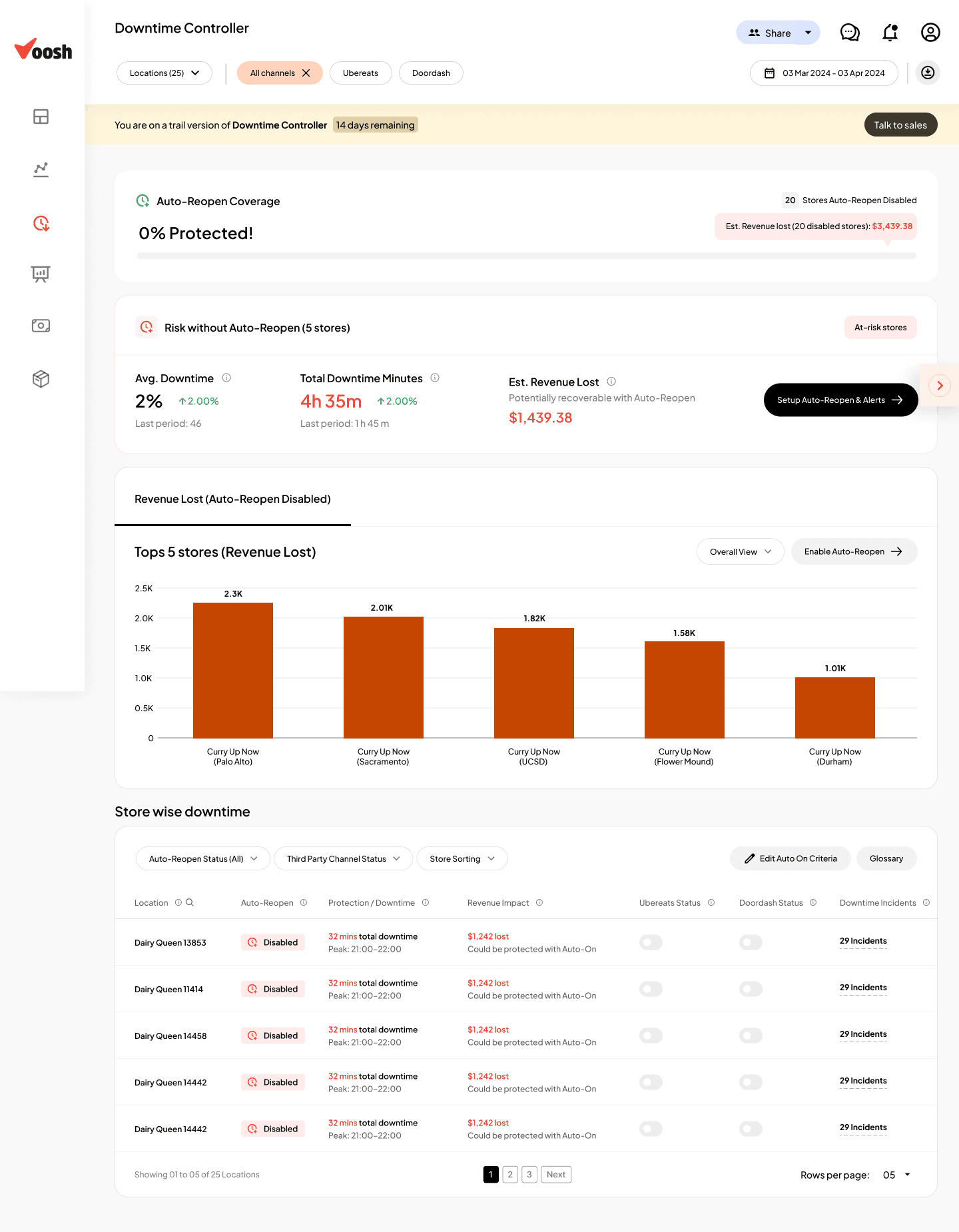
Coverage & risk band (0% Protected state)
Coverage & risk band (0% Protected state)
For accounts that have not set up rules, we show that their stores are “not protected” against non genuine downtime.
This simple band makes the risk visible and gives them a clear reason to start a trial.
For accounts that have not set up rules, we show that their stores are “not protected” against non genuine downtime.
This simple band makes the risk visible and gives them a clear reason to start a trial.
04
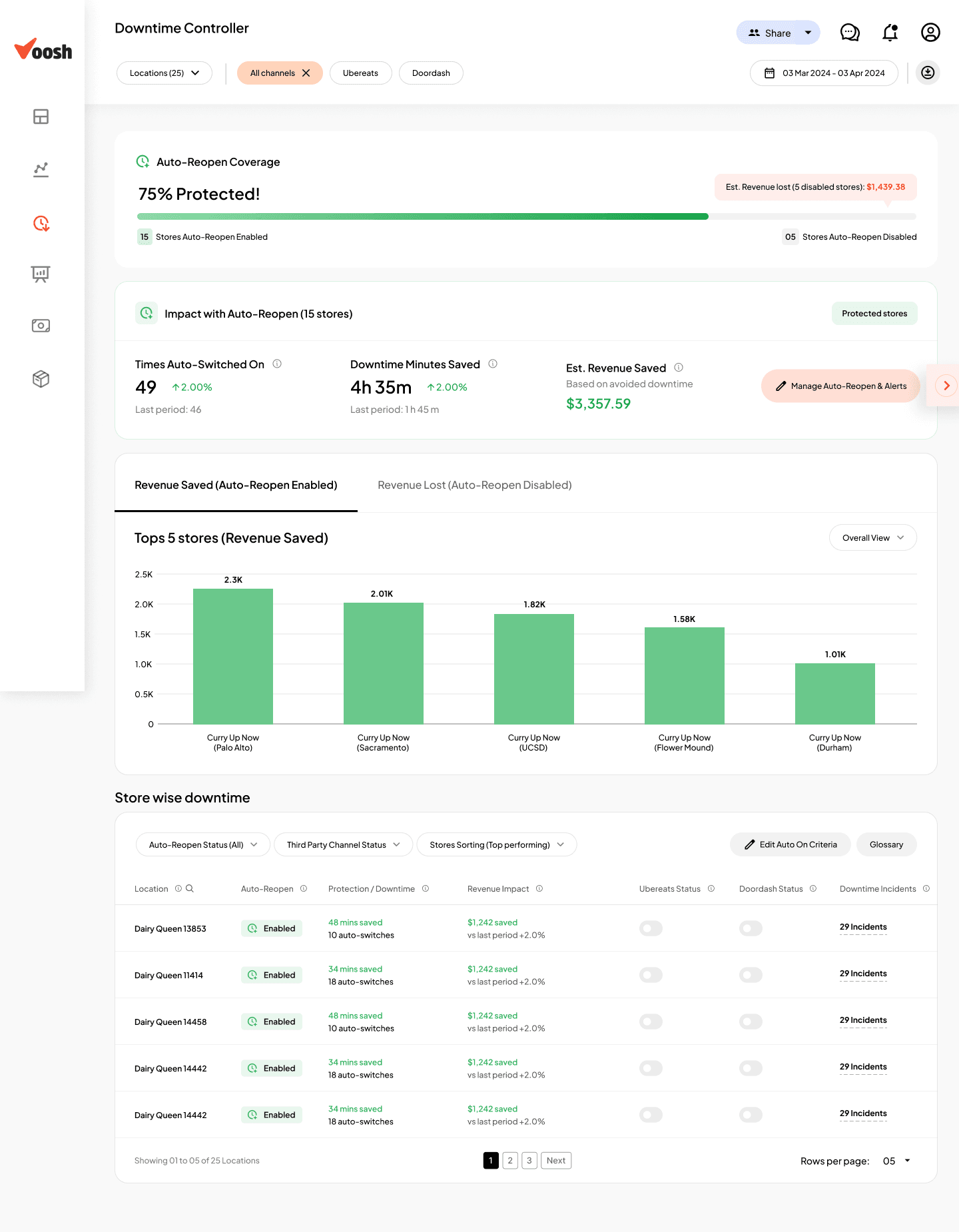
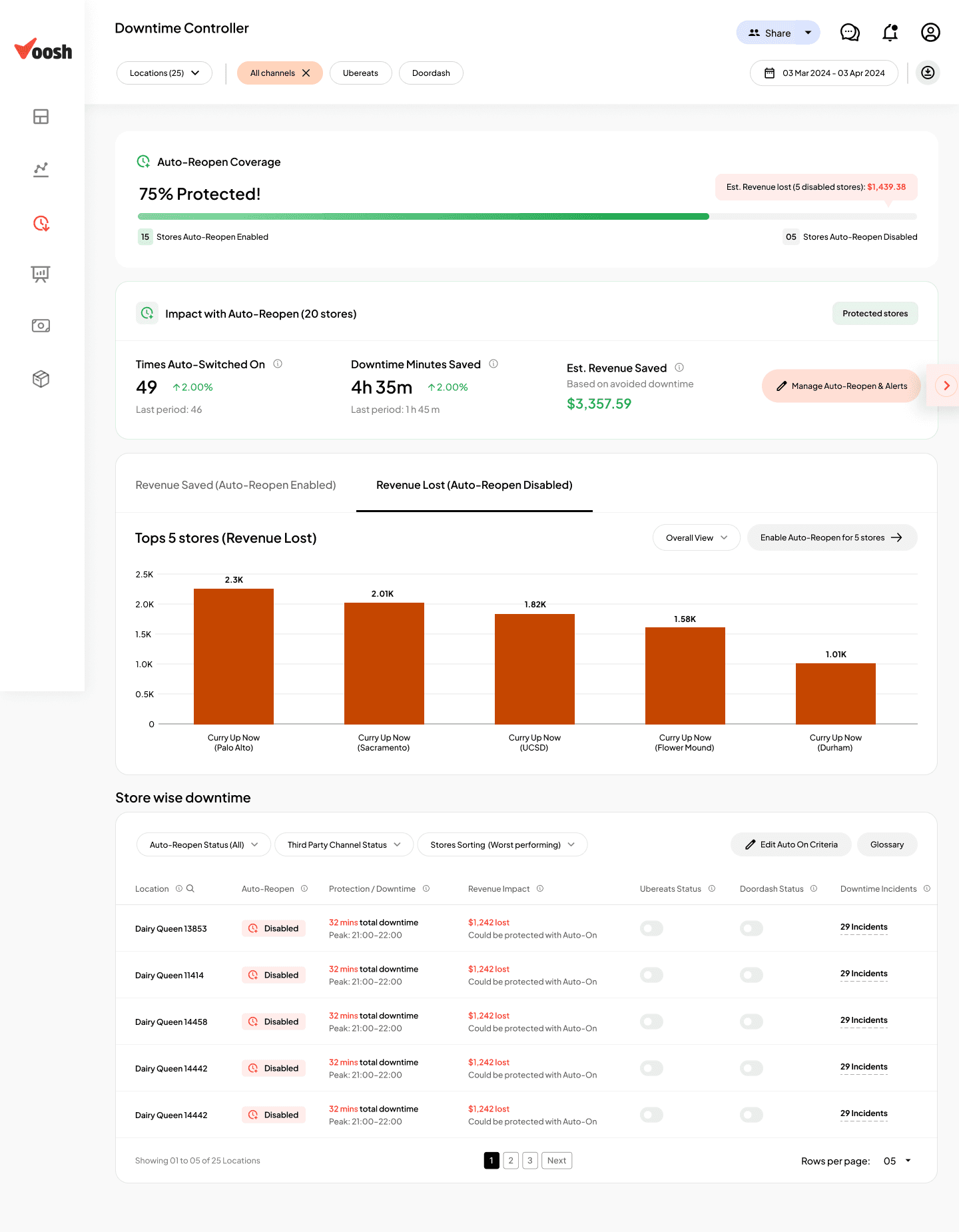
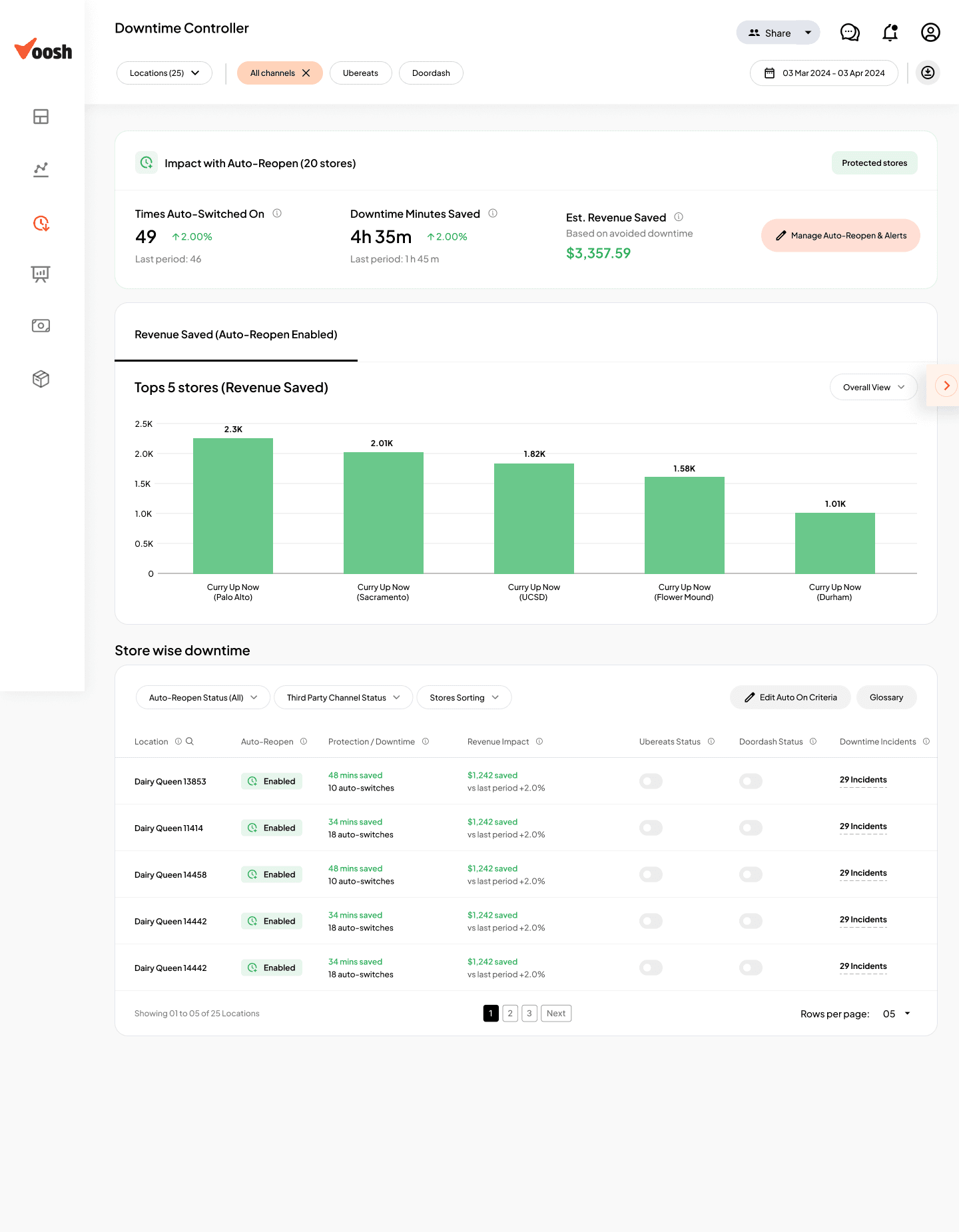
Impact band once Auto-Reopen is enabled
Impact band once Auto-Reopen is enabled
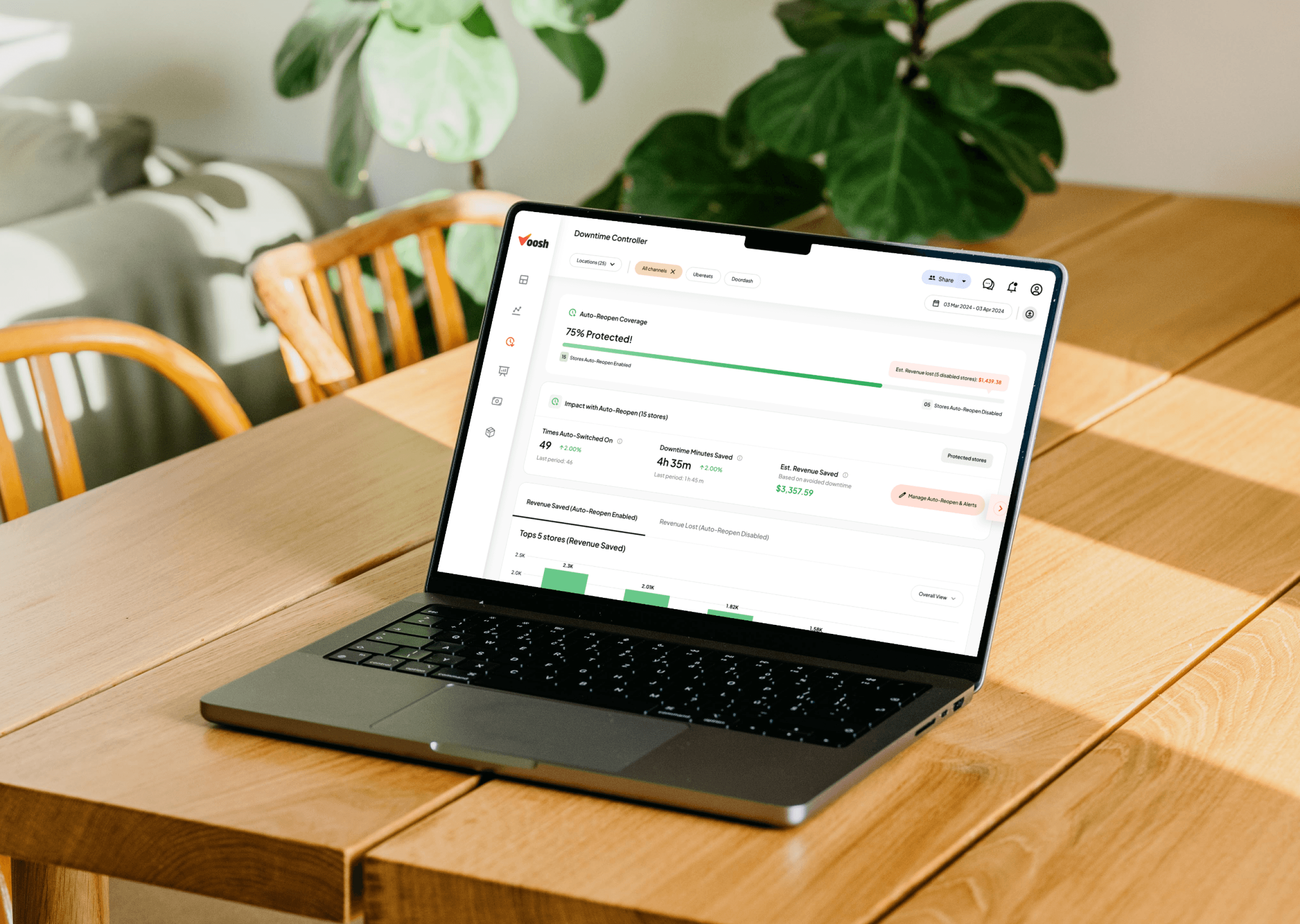
After rules are active, the same area shows what auto reopen has done.
Instead of only uptime numbers, we show incidents handled and money roughly protected in the trial period.
After rules are active, the same area shows what auto reopen has done.
Instead of only uptime numbers, we show incidents handled and money roughly protected in the trial period.
05
Store-wise downtime table as ops cockpit
Store-wise downtime table as ops cockpit
We designed a table view where regional managers can see all stores, their status on each app, and actions taken.
This becomes the main place to check, sort, and fix downtime issues.
We designed a table view where regional managers can see all stores, their status on each app, and actions taken.
This becomes the main place to check, sort, and fix downtime issues.
06
Trial popup & dummy view for safe exploration
Trial popup & dummy view for safe exploration
We added a guided trial with a simple dummy view.
Users can first see how rules would behave, with clear text on what the system will and will not touch, before turning it on for real stores.
We added a guided trial with a simple dummy view.
Users can first see how rules would behave, with clear text on what the system will and will not touch, before turning it on for real stores.
Helped reduce fear of auto-reopen and contributed to 54% more accounts configuring at least one rule.
07
Product-led free trial inside a sales-led motion
Product-led free trial inside a sales-led motion
We kept pricing through sales, but let users start a short free trial from inside the product.
After the trial, sales can talk using actual results, like incidents fixed and money protected, instead of only a pitch.
We kept pricing through sales, but let users start a short free trial from inside the product.
After the trial, sales can talk using actual results, like incidents fixed and money protected, instead of only a pitch.
06
Validation & Impact
Validation & Impact
Pilot & iteration
We first rolled out the new design and trial to a few selected brands and tracked:
Visits to the module
Trials started
Rules configured
Alerts received & clicked
Auto-reopen incidents
Visits to the module
Trials started
Rules configured
Alerts received & clicked
Auto-reopen incidents
We then ran feedback calls with power users and ops heads, and iterated on:
Copy in banners/emails (stronger revenue framing)
Friction points in the guided setup
Clarity of Overview and History
Copy in banners/emails (stronger revenue framing)
Friction points in the guided setup
Clarity of Overview and History
After this, we rolled out to all eligible accounts.
After this, we rolled out to all eligible accounts.
Adoption & activation
Within the first 6 weeks:
Accounts that unlocked Downtime Controller grew by about 80% percent
Accounts that set up at least one auto reopen rule grew by about 54%
Regional managers started opening the Uptime Overview page as part of their daily routine
Accounts that unlocked Downtime Controller grew by about 80% percent
Accounts that set up at least one auto reopen rule grew by about 54%
Regional managers started opening the Uptime Overview page as part of their daily routine
Operational outcomes
Non genuine downtime minutes per store dropped by about 40% across pilot brands
Ops teams reported fewer “why did this outlet stop getting orders” situations
Regional managers started the day from Uptime Overview instead of reacting in chat escalations
Non genuine downtime minutes per store dropped by about 40% across pilot brands
Ops teams reported fewer “why did this outlet stop getting orders” situations
Regional managers started the day from Uptime Overview instead of reacting in chat escalations
Business impact for Voosh
Downtime Controller became a key feature that sales used in demos with multi store brands
Accounts that used Downtime Controller showed better month on month revenue growth compared to similar accounts that did not use it
07
My Role
My Role
I was the only Product Designer on this project.
I worked on:
Defining the problem with the founder and ops team
Studying v1 using Amplitude, Hotjar, and feedback from sales and customer success
Redesigning flows for:
Dashboard uptime card
Uptime Overview, Rules, History
Auto reopen setup
Store level controls and activity log
Designing:
In product messages and notifications
Launch and follow up emails for the trial
Free trial and handoff to sales
Working with engineering to handle edge cases and keep automation safe
Defining the main success metrics and tracking plan for rollout
I was the only Product Designer on this project.
I worked on:
Defining the problem with the founder and ops team
Studying v1 using Amplitude, Hotjar, and feedback from sales and customer success
Redesigning flows for:
Dashboard uptime card
Uptime Overview, Rules, History
Auto reopen setup
Store level controls and activity log
Designing:
In product messages and notifications
Launch and follow up emails for the trial
Free trial and handoff to sales
Working with engineering to handle edge cases and keep automation safe
Defining the main success metrics and tracking plan for rollout
08
Key Learnings
Key Learnings
Shipping a feature is not enough. v1 worked technically but people did not find it or trust it.
Restaurant teams think in orders and money, not in uptime percent. When we changed the story, usage went up.
Automation must feel safe. Showing where auto reopen will act and where it will not is key for trust.
Even if sales closes the deal, the product still needs a simple, self serve way for users to try and feel the value.
Shipping a feature is not enough. v1 worked technically but people did not find it or trust it.
Restaurant teams think in orders and money, not in uptime percent. When we changed the story, usage went up.
Automation must feel safe. Showing where auto reopen will act and where it will not is key for trust.
Even if sales closes the deal, the product still needs a simple, self serve way for users to try and feel the value.
09
Few Screens of the actual new product
Few Screens of the actual new product